
Since I discovered the Mesos-Marathon pair, I always try to use them to put my projects into production. They provide web interfaces where you can check your apps, a very easy REST API to interact with the apps, an easy way of managing the resources of your cluster and, most important for me, High Availability.
Marathon supports Docker containers, which is wonderful news. These days, everything is a container to me. If you launch a Docker container using Marathon’s cmd command, the tool will be able to launch the app and track it as well, but you will not be able to stop it from Marathon.
This tech stack is amazing if your project is microservices-oriented. You launch independent apps, packaged as Docker images, through Marathon. So far it seems to be a perfect scenario, but Mesos will run your apps on one server of your cluster (or several, depending on the number of instances you have launched) that you will not know in advance. If an app doesn’t know where another app it needs to request data from is running, how is it going to work? We have a bunch of blind apps.
We have to add an auto-discovery system. You can find several options; I like to use Mesos-DNS. This tool is a classic DNS, but it asks Mesos which apps are running on it, so through this DNS every app will know where the other apps are. One important thing is how an app is named, because you won’t have an IP or host name; you will have an app name: <the name of the app, that is, its Marathon id>.marathon.mesos.
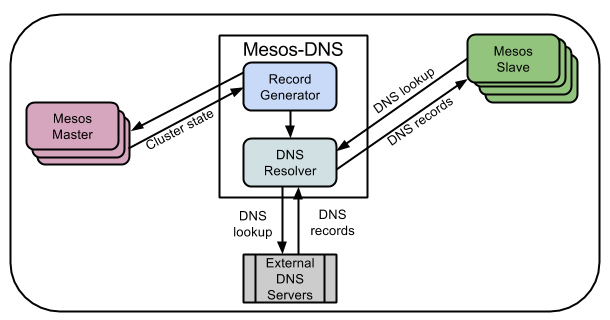
Mesos-DNS will be another app launched through Marathon. You can find several Docker images on Docker Hub. I like tobilg/mesos-dns.
Now we only have to add the DNS to all the Docker containers of our apps. And this is where I ran into a lot of problems.
The network mode has to be HOST if we want Mesos-DNS to work, which is not compatible with adding a DNS through Marathon’s Docker support. We could add a DNS using a regular Docker terminal command through Marathon’s cmd command, but then we would not be able to manage the apps very well. We could overwrite the /etc/resolv.conf file with the configuration we want when the container starts up, but this method is very ugly.
How did I solve it? In a really easy way:
The DNS always has to run on the same server, and we need to know its IP, so you can use Marathon’s constraints to specify where the DNS (or DNSs, to have HA) will run.
If you have your apps in production, you will not try to mix apps from several projects that point to different DNSs. If that is your case, you just have to point the host server to the known IP of Mesos-DNS. Docker copies the host server’s /etc/resolv.conf file into the Docker container when no DNS information is provided. Now we only need to launch our apps through Marathon with HOST as the network option.